How to Prove Compliance in AI-Generated Code
Every security tool tells you what's wrong. None prove what's right. Here's how compliance evidence maps change the audit conversation.
The Problem: AI Writes Code. Auditors Ask Questions.
84% of developers now use AI coding tools (Stack Overflow 2025). Claude Code, Cursor, and Copilot generate thousands of lines of code per week. That code ships to production, handles patient data, processes payments, and runs critical infrastructure.
Then the auditor arrives.
"Show me where you implement encryption at rest."
"Show me your audit logging for ePHI access."
"Show me evidence that your access controls meet SOC 2 CC6.1."
And the engineering team scrambles. Someone opens git blame. Someone searches Confluence. Someone opens a spreadsheet that was last updated three months ago. Six weeks later, the evidence package is assembled — manually, expensively, and probably incomplete.
This is broken. Not because the code is non-compliant, but because there's no automated way to prove it is.
Why Traditional Security Tools Don't Solve This
SAST tools like SonarQube, Semgrep, and Snyk find violations. They tell you "line 45 has an SQL injection vulnerability" or "this function uses MD5 hashing." That's valuable — but it's only half the picture.
When an auditor asks "show me where you implement audit logging," no existing tool can answer that question. They can tell you where audit logging is missing, but they can't point to the file and line where it's implemented.
This gap is the difference between:
- Violation scanning: "You have 7 critical findings" (every tool does this)
- Compliance evidence: "Your code satisfies 124 of 130 applicable requirements, with evidence at these locations" (nobody does this)
Introducing the Compliance Evidence Map
A compliance evidence map inverts the traditional scanner model. Instead of only finding what's wrong, it also identifies where your code satisfies each regulatory requirement — with the exact file, line number, and matched pattern.
For each rule in a compliance framework, the evidence map reports one of four statuses:
- Met — code evidence found that satisfies the requirement
- Violated — violations detected by the scanner
- Manual Review — documentation obligation with no matching docs found
- Not Applicable — no files match the rule's scope
The coverage percentage tells you how many applicable requirements have verified implementations. An auditor can look at "81% coverage — 47 requirements met" and immediately understand your compliance posture.
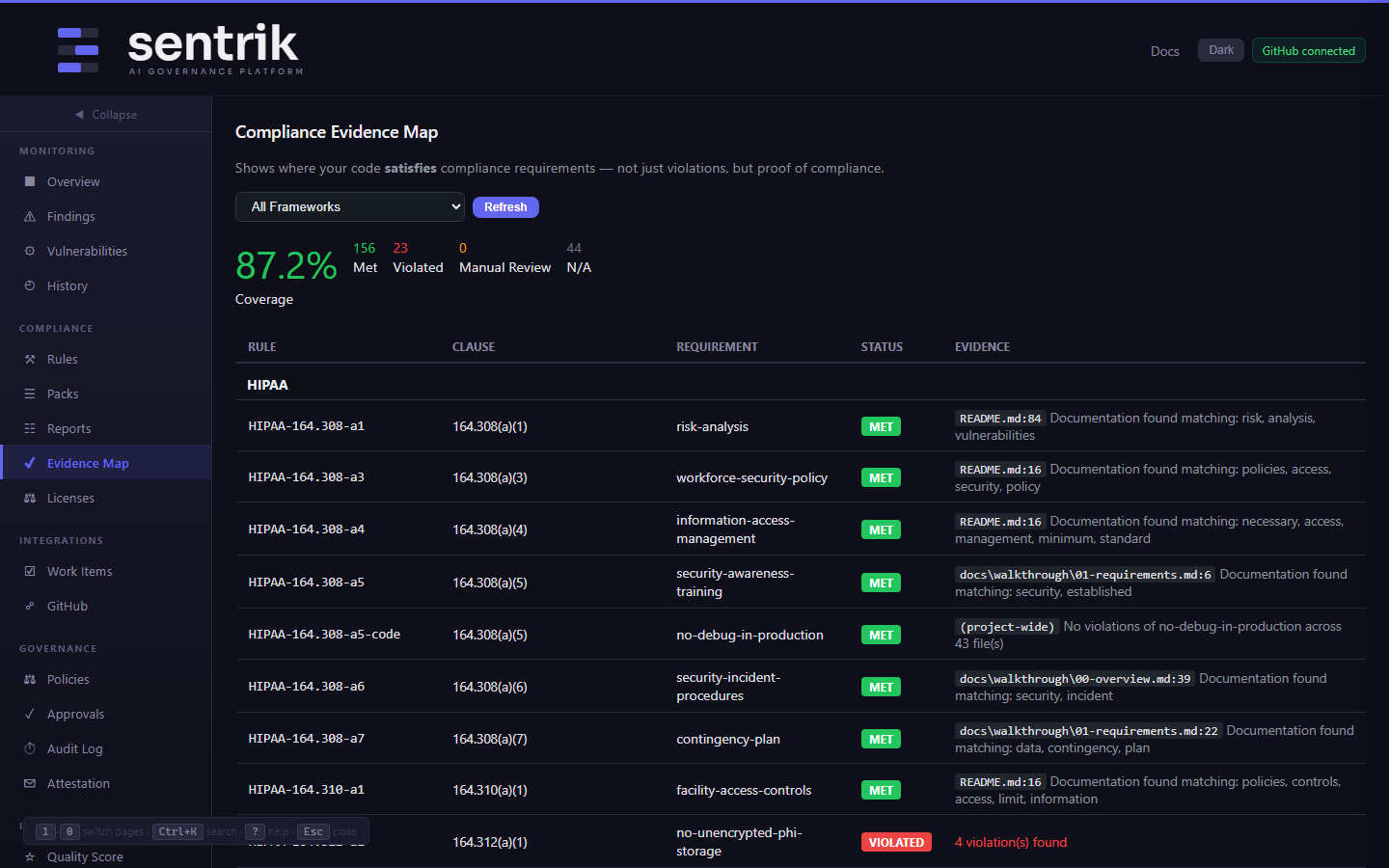
Sentrik's Evidence Map showing 81% OWASP Top 10 coverage — MET badges show where your code satisfies each requirement, with the exact files scanned as evidence
How Evidence Collection Works
Different rule types generate evidence in different ways:
Required patterns become proof of implementation
Many compliance frameworks require specific capabilities to exist in your code. HIPAA requires audit logging. IEC 62304 requires configuration management. SOC 2 requires access controls.
When a required pattern rule finds the pattern in your code, that's evidence:
HIPAA-164.312-b (required_pattern): MET
  → middleware/audit.py:14 — Implements audit-logging-required: import logging
  → api/patients.py:3 — Implements audit-logging-required: import logging
The auditor sees exactly where audit logging is implemented, in which files, on which lines.
Violation rules prove clean code
For rules that check for vulnerabilities (SQL injection, hardcoded secrets, weak crypto), a clean scan across all files is evidence of compliance:
OWASP-A01-001 (regex): MET
  → (project-wide) — No violations of no-permissive-cors across 43 file(s)
Documentation detection satisfies process requirements
Many regulatory frameworks require documentation — risk management plans, data governance policies, security procedures. Sentrik searches your .md, .adoc, .rst, and .txt files for relevant keywords and links them to the requirement:
HIPAA-164.308-a1 (documentation_obligation): MET
  → docs/risk-analysis.adoc:14 — Documentation found matching: risk, analysis, vulnerabilities
If you write your risk management documentation in AsciiDoc and keep it in the repo, Sentrik finds it and links it to HIPAA §164.308(a)(1) automatically.
What This Looks Like in Practice
Here's a real example from a medical device API project scanned against HIPAA, OWASP, SOC 2, and IEC 62304 simultaneously:
$ sentrik compliance-map

Compliance Evidence Map — OWASP Top 10
  Coverage: 81%
  Met: 47    Violated: 32    Manual: 25    N/A: 38
Out of 142 applicable OWASP requirements, 47 have verified code evidence — project-wide clean scans proving the absence of specific vulnerability classes. 32 have active violations that need fixing. The HTML report groups results by framework, so an OWASP auditor sees only Top 10 controls, and a HIPAA auditor sees only their clauses.
Smart Rules: Only Fire When Relevant
Not every rule applies to every project. HIPAA rules shouldn't fire on a fintech app. EU AI Act rules shouldn't fire on a project with no ML code.
Sentrik uses applies_when conditions to make rules contextual:
- HIPAA rules only fire when code contains patient/health/medical/PHI keywords
- EU AI Act rules only fire when PyTorch, TensorFlow, or other ML libraries are imported
- PCI-DSS rules only fire when payment/credit card/merchant keywords are present
This eliminates false positives from irrelevant frameworks and keeps the evidence map focused on what actually applies to your project.
From Evidence Map to Audit Evidence
The evidence map is the foundation. On top of it, you can generate:
- Per-framework compliance reports — clause-by-clause status for a specific standard
- Trust center page — public-safe HTML showing compliance scores without code paths
- Signed attestation — HMAC-SHA256 cryptographic proof of compliance state at a point in time
- Auditor portal — read-only access with time-limited tokens, no codebase access needed
- Evidence export — ZIP bundle with findings, reports, and attestation for audit submission
$ sentrik trust-center --org "Your Company"
$ sentrik attest
$ sentrik auditor create --name "Jane Smith" --email jane@auditor.com
The Agent Dimension: Proving Who Wrote What
There's a newer layer to this problem that didn't exist two years ago: AI agents don't just write code, they write code autonomously — in loops, across multiple files, sometimes outside their declared scope.
Proving compliance now means proving who wrote the code, what scope they were authorized to touch, and whether they stayed within bounds. Sentrik tracks this with task binding:
$ sentrik task-bind "Add audit logging to patient endpoint" \
    --path "middleware/audit.py" "api/patients.py"
The agent declares its intent. If it touches app/auth/login.py or app/secrets/keys.py — files outside the declared scope — Sentrik catches it immediately, blocks the gate, and logs a signed incident record. The signed audit trail captures the agent identity, the declared scope, the actual files touched, and a timestamp — all in a tamper-evident format an auditor can verify.
For EU AI Act Article 18 requirements around AI attribution, Sentrik also generates a per-commit AI attribution report:
$ sentrik ai-attribution --git-range HEAD~10..HEAD

AI Attribution Report
  Commits analyzed: 10
  AI-assisted: 8 (80%)
  Primary agent: claude-code (6 commits)
  Human-only: 2 commits
This is the evidence layer that regulators are starting to ask for — not just "is the code compliant" but "who wrote it and were they operating within declared authority."
Getting Started
Sentrik covers OWASP, SOC 2, HIPAA, IEC 62304, PCI-DSS, EU AI Act, and 16 more frameworks. The VS Code extension shows inline diagnostics on every save. The MCP server lets Claude Code or Cursor query compliance rules before writing code.